The fastest way to get more Google reviews is to ask every customer, at the moment they are happiest, with a direct link that opens the review box in one tap. Get your link from your Google Business Profile, send it by text or email within a day of the job, put a QR code where customers pay, and reply to every review you receive.
That is the whole system. The rest of this guide covers how to set each part up, what to say when you ask, and the Google and FTC rules that can get reviews deleted or your business fined if you get them wrong.
Why Google reviews matter for a small business
Reviews decide whether someone who finds you actually calls. In BrightLocal's 2026 Local Consumer Review Survey, 97% of consumers said they read reviews for local businesses, and 71% said they use Google to read them. Your Google Business Profile is where most of those people will judge you.
Reviews also affect where you show up. Google says local results are based mainly on relevance, distance and prominence, and that review count and review score are factored into prominence. More good reviews will not beat a competitor who is much closer to the searcher, but they help you win the close calls.
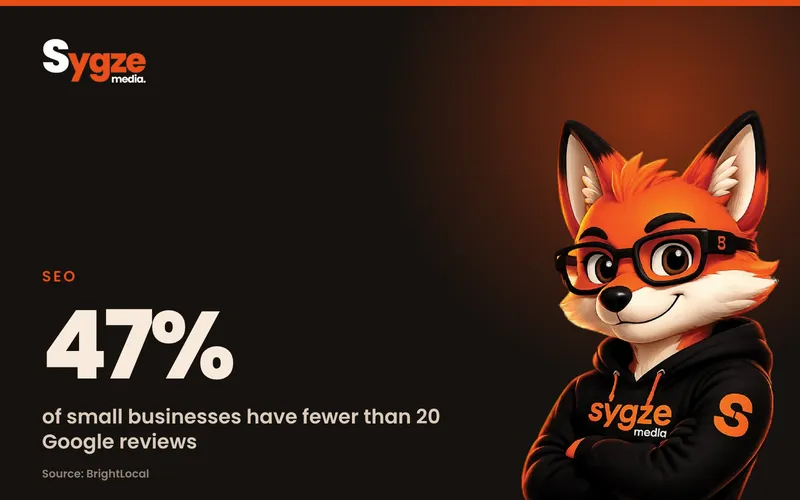
Most small businesses are thin here. BrightLocal's 2026 small business research found 47% of small businesses have fewer than 20 Google reviews and only 16% have more than 50. A steady trickle of fresh reviews is often enough to stand out in your area.
How to get your Google review link
Your review link sends customers straight to the box where they pick a star rating and write a review. It removes the hardest part, which is finding your business and the right button. Google's own steps, on a computer:
- Sign in to the Google account that manages your business and open your Business Profile (searching your business name on Google while signed in also works).
- Select Read reviews, then Get more reviews.
- Select Copy to copy the link, or right-click the QR code and choose Save image as to download it.
- Save the link somewhere your team can reach it, such as your text templates, email signature and booking software.
Google notes that review QR codes can currently only be generated in a computer browser, not on a phone. Do this once at a desk and you have a link and a code you can use for years.
Where to use the link and QR code
- A text message sent after the job is done or the order is picked up.
- Your thank-you or receipt email.
- Invoices and printed receipts, as a short link or QR code.
- A small sign at the register, on the counter or on the table tent.
- Packaging inserts and the back of business cards.
- Your email signature and the confirmation page of your website.
When and how to ask customers for a Google review
Timing matters more than wording. Ask when the customer has just felt the value: the day a repair is finished, right after a successful appointment, or when a delivery arrives. A request three weeks later competes with everything else in their inbox.
Ask in person first, then follow up with the link. A quick, sincere line at the end of a job works better than a form email, because the customer has a face to connect it to. The text or email afterwards just makes it easy to act on.
Review request text message template
Keep it short, personal and neutral. You are asking for an honest review, not a five-star one. For example:
"Hi Maria, thanks for choosing Rivera Plumbing today. If you have a minute, would you share how it went in a quick Google review? It really helps a small business like ours: [your link]"
Review request email template
Email gives you a little more room, but keep the link near the top so it is visible without scrolling. For example:
"Subject: How did we do? Hi James, thanks again for your order. We read every review and use them to improve. If you have two minutes, we would be grateful for an honest Google review here: [your link]. Thank you, The team at Northside Bakery."
Send one reminder at most, three to five days later, and only to people who have not reviewed. Then stop. Repeated chasing annoys customers and does not add much.
Make asking a habit, not a campaign
Reviews work best as a steady flow. A burst of 40 reviews in one week followed by silence looks odd and does not keep your profile fresh. Build the request into your normal process: a step in your job checklist, an automatic text from your booking or CRM software when a job is marked complete, or a line staff say at checkout.
Rules to follow: what Google and the FTC don't allow
Getting this wrong can cost you more than the reviews themselves. Google removes reviews that break its policies and can restrict your profile, and in the US the Federal Trade Commission now has a specific rule on reviews.
Google's review policies
Google's Maps content policy allows businesses to encourage genuine reviews, as long as they do not offer incentives or try to influence the rating or content. It specifically does not allow you to:
- Offer payment, discounts, free goods or services in exchange for a review, or for changing or removing a negative one.
- Discourage negative reviews, or ask only your happy customers for reviews (often called review gating).
- Pressure customers to leave a review while they are still on your premises.
- Give staff a quota of reviews to collect, or ask them to get reviews that mention them by name.
- Post reviews from multiple accounts, or have owners and employees review their own business.
Note that Google is stricter than federal law on incentives. A raffle entry or a 10% coupon for leaving a review breaks Google's policy, even if the review is honest.
The FTC rule on fake reviews
The FTC's rule on consumer reviews and testimonials took effect on October 21, 2024, and lets the agency seek civil penalties against businesses that knowingly break it. It bans fake or AI-generated reviews, buying reviews that must express a particular sentiment, undisclosed reviews from owners, managers and employees, and using threats or intimidation to get negative reviews removed.
The FTC's own guidance says the rule does not ban asking customers for reviews. It also warns that asking only customers you expect to be happy, while not named in the rule, could still violate the FTC Act. The simple, safe approach: ask everyone, offer nothing in return, and never write or buy a review.
How to respond to Google reviews, good and bad
Replying shows future customers that someone is paying attention, and Google lists replying to reviews as one of its own tips. BrightLocal's 2026 small business research found only 51% of small businesses respond to reviews, so replying consistently is an easy edge.
- Reply to every review, positive and negative, within a few days.
- Thank the person by name and mention something specific, so it does not read like a template.
- Keep it conversational, not promotional. Google advises against using replies to push deals.
- Never share a customer's personal or job details in a public reply.
How to respond to a negative Google review
Stay calm and treat the reply as a message to the next customer, not just the unhappy one. Acknowledge the problem, apologize where it is fair, and offer to fix it offline with a phone number or email. Do not argue about details in public.
If a review is fake, from someone who was never a customer, or breaks Google's content policy, you can report it from your Business Profile. Google removes reviews that violate its policies; it does not remove reviews just because they are negative. A mix of good and less good feedback can actually look more trustworthy, as Google itself points out.
A simple weekly review routine
You do not need special software to start. A small business can run this in 15 minutes a week:
- Monday: check last week's completed jobs or orders and make sure each customer got a review request.
- Send one reminder to anyone from the week before who has not reviewed.
- Reply to every new review.
- Report any review that is clearly fake or abusive.
- Once a month, note your total review count and average rating, and read the reviews for patterns you can fix.
As volume grows, review request features in booking tools and CRMs can send the texts automatically. The rules above still apply to any software you use: it must ask every customer, not just the ones who rated you highly in a private survey first.
Frequently asked questions
How many Google reviews does a small business need?
There is no fixed number. What matters is how you compare with the other businesses that show up for the same searches in your area, and whether your reviews are recent. Look at the top three results on Google Maps for your main service and aim to match or pass their count over time.
Can I offer a discount for a Google review?
No. Google's policy prohibits offering payment, discounts, free goods or services in exchange for a review, even an honest one, and those reviews can be removed. The FTC rule also bans incentives tied to a positive review. Ask every customer and offer nothing in return.
Can my employees or family leave Google reviews?
They should not. Google treats reviews from people with a conflict of interest, including current or former employees, as grounds for removal. The FTC rule also bans undisclosed reviews from owners, managers and employees. Ask your real customers instead.
Why did my Google review disappear?
Google filters reviews it believes break its policies, such as reviews posted after an incentive, many reviews arriving in an unusual burst, or reviews from accounts linked to your business. Sometimes a reviewer deletes their own review. Asking a steady stream of real customers is the best protection.
How do I get the link for customers to leave a Google review?
On a computer, open your Business Profile, select Read reviews, then Get more reviews, and copy the link or save the QR code. Share it by text, email or on printed receipts. Customers need to be signed in to a Google account to post a review.
Can I remove a bad Google review?
Only Google can remove a review, and only if it breaks Google's policies, such as spam, fake engagement, off-topic content or harassment. You can report it from your Business Profile. For honest negative reviews, a calm public reply and an offer to fix the problem is the best response.
Want to see how your Google profile and reviews stack up? Take the free 2-minute digital marketing scorecard at sygze.com/scorecard, or message Sygze on WhatsApp for a free 10-minute audit.
Sources
- Google Business Profile Help: Tips to get more reviews and reply to reviews
- Google Business Profile Help: Create a Google link or QR code to request reviews
- Google Maps Help: Prohibited and restricted content (fake engagement)
- Google Business Profile Help: How to improve your local ranking on Google
- FTC: Final rule banning fake reviews and testimonials
- FTC: Consumer Reviews and Testimonials Rule questions and answers
- BrightLocal: Local SEO statistics